Adinand Innovations

Press kit

Facts, screenshots, demo videos and contacts for anyone writing about the studio or its four apps.

Last reviewed 7 October 2026

Studio

About the studio

Adinand Innovations is an independent app studio in India. It makes four small utilities for iPhone and Android: Adinand Email Cleaner, DocFind, SubSense and Adinand Auto File Sorter.

What the four have in common:

  • None of our apps has a server of its own, and where an app needs the internet, it talks to Google's own APIs and to the app store for billing, never to a server of ours.
  • There is no ad SDK and no analytics SDK in any of the four apps, and nothing about how you use them is reported to us.
  • Every app has a demo mode with sample data, so you can see how it works before granting a permission or signing in to an account.
  • Each app is free to download, and a Pro upgrade is sold as an in-app purchase through the App Store or Google Play.

One exception to Google-only traffic exists, in the Email Cleaner's Unsubscribe; the diagram further down shows it.

Each app has its own website with a privacy policy, a support page and, where the app handles account access, a security page.

Apps

The four apps

Prices are set per country by each store and can change, so this page names the shape of each plan and links the listing for the figure.

Adinand Email Cleaner app icon

Adinand Email Cleaner

Gmail cleanup, by sender.

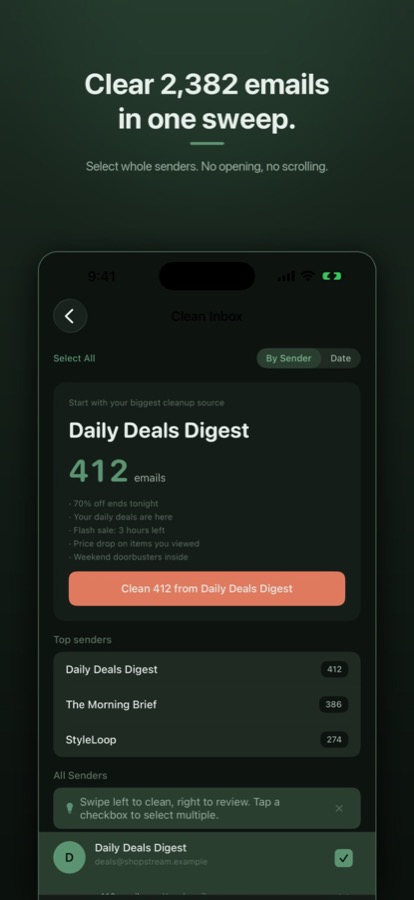
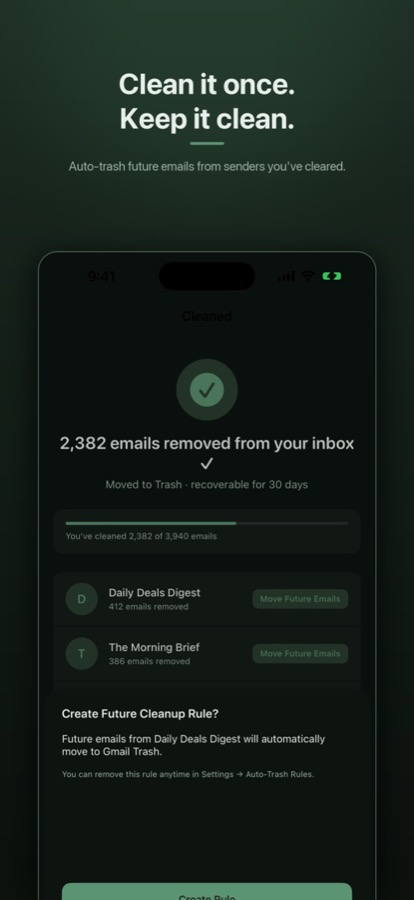
Adinand Email Cleaner works with Gmail. It groups the mail by sender, so you see what you are about to clean, and moves mail from the senders you choose to Gmail's Trash; it has no permanent-delete function. Auto-trash rules are created as native Gmail filters, so they keep working even if the app is deleted. All email processing happens on your device. The app has no servers of its own, and it only ever asks Gmail for headers, never message bodies. No ads, no ad SDKs.

Platforms
iPhone, iPad, and Android.
Needs
A Gmail account. At sign-in the app asks Google for three permissions: gmail.modify, to move messages to Trash and change labels; gmail.settings.basic, to create the Gmail filters behind auto-trash rules; and userinfo.email, to show which account is signed in.
Security
Independently security assessed: App Defense Alliance CASA Tier 2, performed by TAC Security.
Price
Free to try. Pro comes monthly, annually or as a lifetime purchase. Every plan unlocks the same thing: unlimited cleanup and unlimited auto-trash rules. Monthly and annual plans renew automatically until cancelled. The current price is on each store listing.
Adinand Email Cleaner with sample data: mail grouped by sender, the biggest sender offered first. After a clean with sample data: the cleaned senders, and an offer to move their future mail to Gmail Trash with a rule.

Screenshots as published on adinandemail.com.

DocFind app icon

DocFind

Search inside every PDF you own.

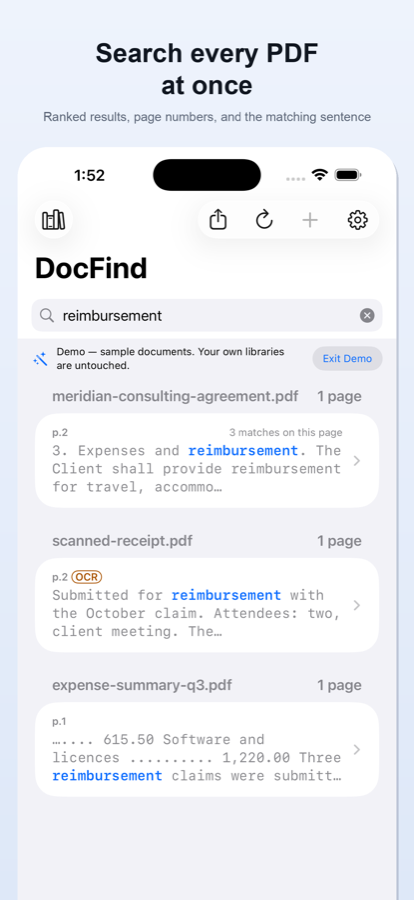
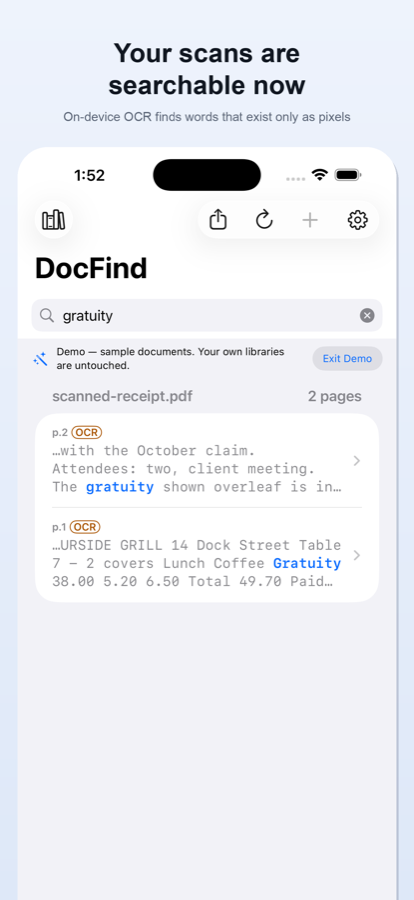
DocFind searches inside many PDFs at once, and its results show the file, the page, and the surrounding text. Tap a result to open that PDF at that exact page, with your keywords highlighted. Scanned PDFs are searchable too: DocFind reads them on your device, then searches them like any other document, and matches found through OCR are labelled as such. Searching, indexing, reading scanned pages and exporting all work with no internet connection. Your documents never leave your device. No ads. No analytics. No tracking.

Platforms
iPhone and Android.
Needs
No account needed.
Price
Free to download, with a free tier. Pro comes as a monthly or yearly subscription, or as a lifetime purchase, a one-time purchase that does not renew. Every plan unlocks exactly the same thing. Subscriptions renew automatically until cancelled; cancel any time. The current price is on each store listing.
DocFind demo: a search for “reimbursement” across three sample PDFs, each result with its page and the surrounding text. DocFind demo: a search for “gratuity” finds words on a scanned receipt, each match labelled OCR.

Screenshots as published on docfindapp.com.

SubSense app icon

SubSense

Tidy your YouTube subscriptions.

Sign in with Google and SubSense organises the YouTube channels you follow into smart categories. It shows which channels have gone quiet or flood your feed, and lets you swipe through your feed one channel at a time: keep or let go, with the reason on the card. You can unsubscribe from channels you no longer watch without leaving the app. You approve every removal, never automatically, and never without seeing exactly what will be removed first. Changed your mind? Undo re-subscribes you and puts the channel back in its category. No third-party servers. No ads, no analytics, no tracking. SubSense is an independent tool, not affiliated with YouTube.

Platforms
iPhone and Android.
Needs
A Google account. Two YouTube permissions, requested up front in one consent screen.
Price
Free to download. The free way to unsubscribe is always there: open any channel in YouTube and do it yourself, unlimited and never metered. In-app removals start free; unlimited in-app removals come with a monthly, yearly or lifetime purchase. The current price is on each store listing.
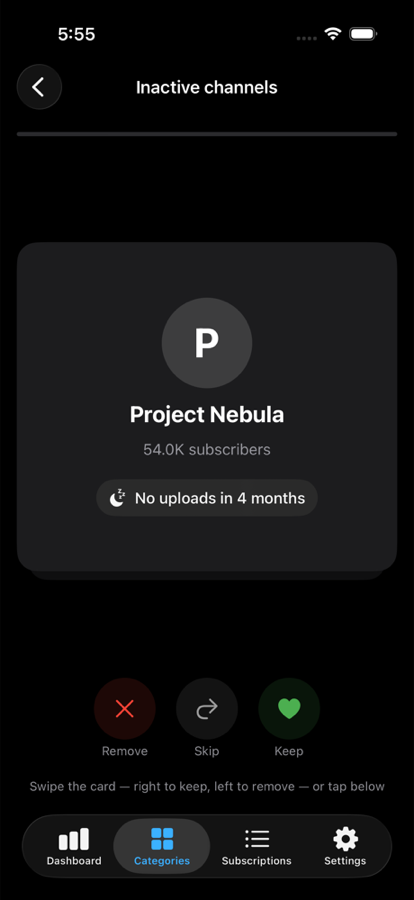
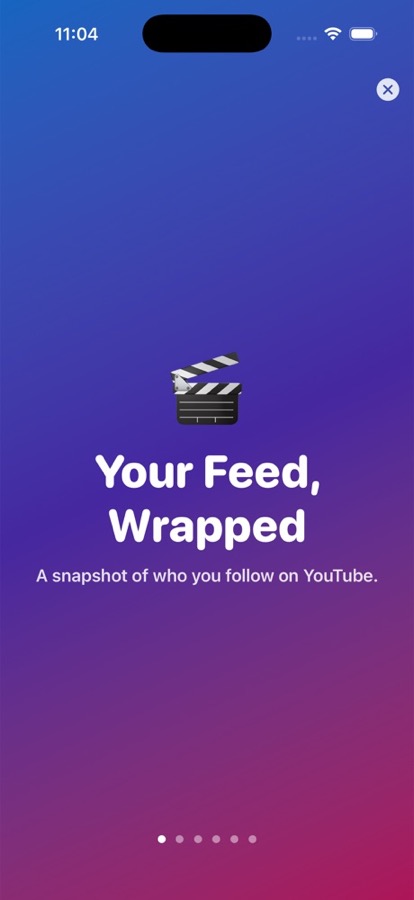
SubSense triage card for an inactive channel, “No uploads in 4 months”, with Remove, Skip and Keep. SubSense “Your Feed, Wrapped” opening screen: a snapshot of who you follow on YouTube.

Screenshots as published on subsenseapp.com.

Adinand Auto File Sorter app icon

Adinand Auto File Sorter

Automatic file sorting for Android.

Adinand Auto File Sorter moves the files sitting directly in the folders it watches into category folders (Documents, Images, Videos, Apps, Audio, Archives and Others), chosen by file extension. They go to Downloads › Sorted Files by default; on Android 11 and newer you can pick a different folder. Sub-folders are never sorted. Before a manual sort, an optional preview shows what will move. Sorting never deletes anything: each file is copied, checked, and only then removed from where it was, and Undo puts files back. Sorting works fully offline; the only network use is Google Play Billing.

Platforms
Android only, Android 10 and newer.
Needs
On Android 11 and newer, the system's All files access permission, which the app needs to see and move the files in the folders it sorts. On Android 10 it uses the older storage permission.
Price
Free to download, and manual sorting is free and unlimited, with undo for the most recent sort. Pro is a single one-time in-app purchase that adds background sorting, custom rules, more watched folders (Android 11 and newer) and undo for any past sort. The current price is on the Google Play listing.
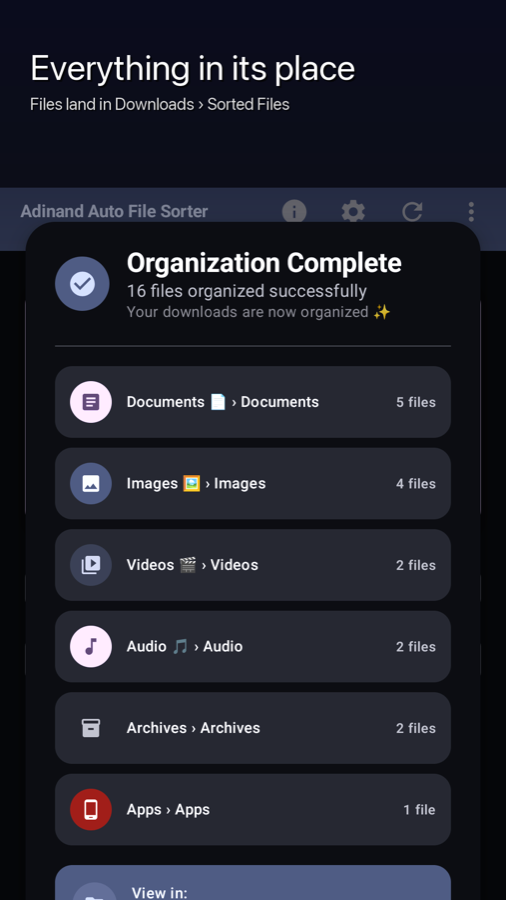
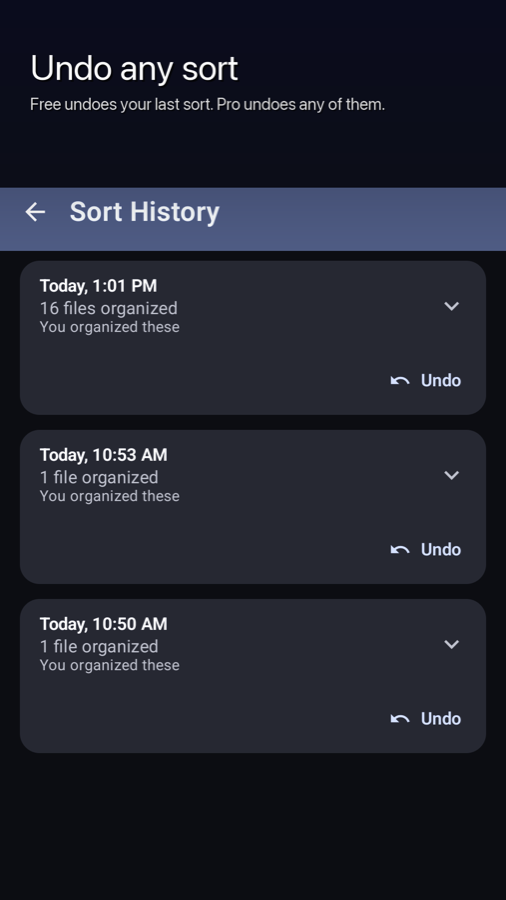
Adinand Auto File Sorter after a sort: files moved into Documents, Images, Videos, Audio, Archives and Apps folders. Adinand Auto File Sorter's Sort History, with Undo on each past sort.

Screenshots as published on adinandsorter.com.

Architecture

How Adinand Email Cleaner handles your mail

From Gmail to your decision and back, in five steps 1. You sign in with Google and grant the app access. 2. The app asks Google's Gmail API for message headers only. 3. Senders are grouped, counted and sized on the phone. 4. You choose the senders to clean and the rules to create. 5. The app moves that mail to Gmail's Trash and creates Gmail filters through the Gmail API. The one exception to Google-only traffic: when you tap Unsubscribe and the sender supports one-click unsubscribe, the phone sends that request straight to the sender, with no email content; otherwise the app opens the sender's unsubscribe link or address in another app. LEAVES THE PHONE · TO GOOGLE 1 · Sign in with Google You grant the app access to your Gmail on Google's own sign-in screen (OAuth). LEAVES THE PHONE · TO GOOGLE 2 · Headers only The app asks the Gmail API for headers. Bodies and attachments are never fetched. STAYS ON THE PHONE 3 · Worked out on the phone Senders are grouped, counted and sized on your device. No server of ours sees it. STAYS ON THE PHONE 4 · You decide You choose the senders to clean and the auto-trash rules to create. LEAVES THE PHONE · TO GOOGLE 5 · Gmail API action Chosen mail moves to Gmail's Trash; rules become Gmail filters. THE ONE EXCEPTION · TO ONE SENDER Only when you tap Unsubscribe With one-click senders, the request goes straight to them, no email content; otherwise a link or mail draft opens.

What leaves the phone

  • Sign-in with Google, and the app's requests to Google's Gmail API: asking for headers, moving the mail you chose to Trash, creating Gmail filters.
  • Only when you tap Unsubscribe and the sender supports one-click unsubscribe: that request, to that sender, with no email content. Otherwise the app opens the sender's unsubscribe link or address in another app.

What stays on the phone

  • What the app fetched and keeps: message id, thread id, sender address, subject line, date, size in bytes, and unsubscribe headers.
  • The grouping by sender, the counts, and the space totals.
  • Message bodies and attachments are never fetched, so they are never on the phone either.

Adinand Email Cleaner has no servers of its own; your device talks directly to Google's Gmail API. Every message request asks Gmail for headers only, so the app never fetches body text, and there is none to store. The one deliberate exception to Google-only traffic is Unsubscribe: when you tap it and the sender supports the one-click method for the List-Unsubscribe header (RFC 8058, read 7 October 2026), the phone sends that request straight to the sender's unsubscribe address, with no email content. When a sender does not, the app opens the sender's unsubscribe link in your browser or a mail draft in your mail app instead. Links you tap, such as a store page, Google's policy pages or our legal pages, open in another app; the app itself does not fetch them.

Assets

Logos and icons

The files below are the ones this site already serves. Adinand™ is a trademark of Adinand Innovations (registration pending).

Sources

For fact-checkers

These files are the studio's own published claims, in machine-readable form. The store listings, not these files, are the source for prices.

Adinand Innovations
facts.json · llms.txt
Adinand Email Cleaner
facts.json · llms.txt
SubSense
facts.json · llms.txt
Adinand Auto File Sorter
facts.json · llms.txt

Contact

Press contact

Press and studio questions: support@adinand.com. Each app also has its own support address.

Adinand Email Cleaner
support@adinandemail.com
Adinand Auto File Sorter
support@adinandsorter.com